


Modern warehouses don’t stand still. Processes evolve, labor models shift, automation expands, and customer expectations keep rising. Yet too often, the user interface inside a WMS becomes rigid, locked behind hard-coded screens that require costly development just to make small operational changes.
Softeon’s Composable UI changes that model entirely.
Instead of customizing code, Composable UI allows organizations to configure operational workflows using a no/low-code framework. The result is a warehouse interface that evolves as fast as your operation, without creating fragile custom versions of the software.
What Is Composable UI?
Composable UI is Softeon’s framework for defining and orchestrating WMS workflows using two foundational building blocks:
- Forms define what users see and interact with
- Flows control logic, data access, API calls, and workflow progression
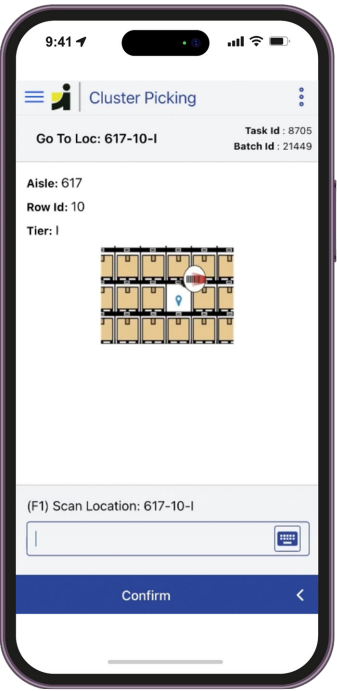
By chaining Forms together through Flows, teams can build complete operational workflows, such as receiving, picking, cycle counting, and exception handling, entirely through configuration.
There’s no need to hard-code screens or fork the application. Instead, workflows remain declarative, modular, and upgrade-friendly.
Think of it as assembling operational experiences from reusable components. Fast to change, easy to govern, and built to evolve.
Why Composable UI Matters for Warehouse Operations
Warehouse execution is dynamic. Seasonal peaks, new automation, changing labor strategies, or evolving customer requirements all demand UI flexibility.
Composable UI enables:
- Tailored user experiences for each workflow or role
- Faster adaptation when processes change
- Reduced upgrade friction
- Lower long-term maintenance risk
Rather than forcing operations to conform to static screens, the interface becomes a strategic asset. One that can continuously optimize productivity and usability.
The outcome is straightforward:
Faster change. Lower risk. Future-ready operations.
Key Benefits
- No Dedicated Frontend Development Required
Forms and Flows behave like configuration, created, tested, and deployed without traditional UI coding.
- Upgrade-Friendly by Design
Customers get tailored workflows without breaking away from the standard WMS architecture, simplifying upgrades.
- Configurable
Out-of-the-box Softeon workflows are tuned through configuration rather than rewritten.
- Built for Operational Flexibility
Screen flows, logic, and data behavior evolve as your warehouse evolves.
How It Works
Composable UI follows a clear workflow model:
- Define the Form — layout, fields, and actions
- Configure the Flow — logic, APIs, and data behavior
- Chain Forms into an operational sequence
- Test and deploy — no UI code required
Because workflows are declarative, they are easier to audit, optimize, and automate over time.
Consistent Experience Across Platforms
Composable UI supports both:
- Web-based interfaces
- Android mobile workflows
This ensures operational consistency across devices, from desktops to handheld scanners, while maintaining centralized configuration control.
Turning Configuration into Competitive Advantage
As part of Softeon WMS Enablement Tools, Composable UI empowers fulfillment teams to innovate faster through configurable workflows, adaptive user experiences, and upgrade-friendly design. By separating interface logic from hard-coded development, Composable UI allows operations to evolve safely and efficiently, ensuring the WMS can scale, adjust, and improve alongside the business.
Learn how Composable UI and the full suite of Softeon WMS Enablement Tools empower faster, safer warehouse innovation. Read the data sheet, then reach out to Softeon.